Choosing Your Video Model
Kling, Seedance and the rest — how each one receives your frames and your characters, and when each wins.
StoryDirector renders your shots through a choice of video models. They differ in ways that matter to the finished film — cost per second, whether they can speak, what resolutions they reach — and in one way that is not obvious from any list: how each one receives the previous shot's frame and your characters' faces.
That last difference is the one worth understanding, so this guide gets to it properly rather than handing you a table and wishing you luck.
The two controls
The render console gives you two knobs, and they interact.
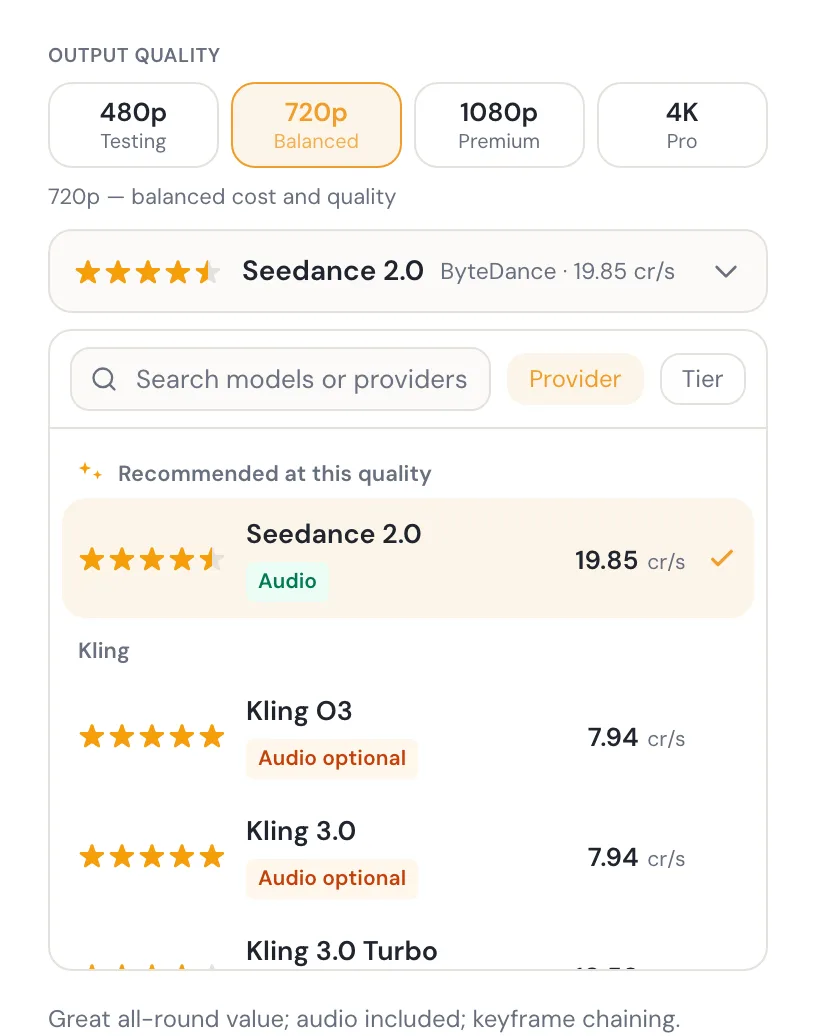
- Output quality Four buckets — 480p for testing, 720p balanced, 1080p premium, and 4K. Quality is chosen first because it filters the list: a model only appears at resolutions it actually supports.
- The model Grouped by provider or by tier, searchable, with a "Recommended at this quality" pin at the top. Picking a quality your current model cannot reach moves you to one that can.
How the recommendation is chosen
The pin is not marketing. It is the model configured as recommended, when that model is available at the quality you picked. If it is not, the pin falls to the highest-rated model that is available at that quality, and ties break toward the cheaper one.
Reading a row
Each row carries a star rating, the provider, the tier, and the cost at your chosen quality — either per second of video or, for a few models, per clip. The unit is printed next to the number, so a per-clip model never looks accidentally cheap.
The coloured pill is the audio state, and it has three values:
- Audio — included, on by default, no surcharge.
- Audio optional — the model can produce sound, but it is a paid tier and it is off unless you turn it on. Turning it on changes the price you see.
- No audio — a silent model. Your dialogue still shapes the performance; it just will not be voiced.
A model can also be listed but not selectable — either it is not wired up yet ("coming soon"), or it cannot serve the particular shot you are rendering. In the second case the console tells you the reason on the row itself rather than just greying it out.
The difference that matters: how a model receives a frame
When one shot continues from the shot before it, StoryDirector extracts the previous shot's final frame and hands it to the model as the starting point. Every model family accepts that frame — but they accept it through different doors, and the door shapes what else can travel with it.
Kling
Kling models have exactly one image seat, and the chained frame goes into it as the literal starting frame. The model also derives the aspect ratio of the shot from that frame rather than being told separately. This is the path StoryDirector's chained continuity was proven on — frames continuing cleanly from one shot into the next across a scene is behaviour we have watched work on real renders.
The cost of having one image seat is that it is occupied. When a shot needs a scene's set image instead of a chained frame, that set image takes the seat.
Seedance
Seedance models take the chained frame as the first entry of an image list rather than as a named start-frame parameter. The engine sends exactly one entry for a chained shot, so the frame is still the seed — the difference is the shape of the envelope, not the contents.
What we are not claiming
We have proven Kling's frame continuation on production renders. We have not yet published a like-for-like comparison of how faithfully each family holds a chained frame, so this guide does not rank them on that. When we have the measurement, this section will say so.
The other difference: how a model receives your characters
Character identity travels separately from the frame, and this is where the families genuinely diverge in what they can do.
- Kling takes elements. Your approved character identities are registered with the provider and referenced by name inside the prompt. The ceiling is three per shot.
- Seedance takes ordinal reference images. The identity images ride along as numbered references — "image 1", "image 2" — which the prompt refers to in plain language. The ceiling is nine.
- Some models take neither. Then likeness comes from your written description alone, and the console says so in words rather than pretending otherwise.
In practice: if a shot has a lot of named people in frame, a model with a higher reference ceiling has more to work with. If your shots are one or two characters at a time — which most shots are — the ceiling rarely binds.
Character Generation & Identity covers what those identities are and how to get good ones.
Pick one model and stay with it
This is the product's own advice, shown in the render console, and it is the highest-value thing on this page: render every scene in a story with the same model. Models differ in palette, skin rendering, motion character and grain. Mixing them inside one film reads as a continuity error even when every individual shot is good.
Do
- Render one test shot, judge it, then commit to that model for the film.
- Choose the quality you will actually deliver at before you render the rest.
- Turn audio on deliberately, knowing it changes the price.
Don't
- Switch models halfway through because a newer one appeared.
- Render the whole story at 1080p to find out whether you like the model.
- Assume a silent model is broken — check its audio pill.
The models available right now
This table is generated from the same registry the render console reads, at the moment you loaded this page — so it is current by construction. Costs shown are at 720P; the console reprices as you change quality. Credit values are provider rates, not your plan's allowance — see pricing for what you get.
| Model | Provider | Tier | Audio | Resolutions | Cost |
|---|---|---|---|---|---|
| Seedance 2.5 Text, image, and ordinal reference video with included audio. | ByteDance | Production | Included | 480P · 720P | 29.53 cr/s |
| Seedance 2.0 Great all-round value; audio included; keyframe chaining. | ByteDance | Production | Included | 480P · 720P · 1080P | 19.85 cr/s |
| Wan 3.0 Same 30 s envelope and reference input as Seedance 2.5 at about a quarter of the cost. | Alibaba | Production | Included | 480P · 720P · 1080P | 7.5 cr/s |
| Wan 3.0 Prime Wan 3.0 with much faster turnaround; about 40% of Seedance 2.5’s cost. | Alibaba | Production | Included | 480P · 720P · 1080P | 11.9 cr/s |
| Veo 3.1 Fast Veo quality at reduced cost; optional audio. | Premium | Optional | 720P · 1080P · 4K | 8.47 cr/s | |
| Kling O3 Kling flagship quality with element control. | Kling | Production | Optional | 720P · 1080P · 4K | 7.94 cr/s |
| Kling 3.0 Top-tier motion + prompt adherence; great value. | Kling | Production | Optional | 720P · 1080P · 4K | 7.94 cr/s |
| Kling 3.0 Turbo Faster Kling 3.0 variant. | Kling | Production | — | 720P · 1080P | 10.58 cr/s |
| Wan 2.7 Strong motion; first/last-frame control. | Alibaba | Production | — | 720P · 1080P | 8.82 cr/s |
| Wan 2.6 Solid value; first-frame i2v. | Alibaba | Production | — | 720P · 1080P | 7.5 cr/s |
| Sora 2 OpenAI Sora; synced audio; fixed 4/8/12s clips. | OpenAI | Production | Included | 720P | 33.87 cr/clip |
| Hailuo 02 MiniMax Hailuo; 6/10s clips. | MiniMax | Production | — | 480P · 720P · 1080P | 26.46 cr/clip |
| Seedance 1.5 Pro Cheap drafts; optional paid audio. | ByteDance | Draft | Optional | 480P · 720P · 1080P | 2.61 cr/s |
| Seedance 1 Pro Fast Cheapest drafts for fast iteration. | ByteDance | Draft | — | 480P · 720P · 1080P | 1.97 cr/s |
| Grok Imagine Cheap, fast; reference-image driven. | xAI | Draft | — | 480P · 720P | 2.35 cr/s |
Models marked "coming soon" are wired into the registry but not yet generatable. A model that supports no pricing at 720P is available at its own resolutions, listed in the same row.
Next
Model chosen, the rest is execution. The Director Output covers rendering, what a chain of shots costs before you commit, and the one rule about re-rendering that will save you the most credits.
Ready to direct one of your own?