Writing Your Story
How the engine reads prose: beats, dialogue, cast names, and the structure that survives compilation.
StoryDirector reads prose. Not a screenplay format, not a shot list, not a form — the story as you would write it for a person. But it reads it structurally, and a few small habits change how much it can do with what you give it.
None of this is about writing better. It is about writing in a way the engine can see.
The three choices you make first
Before you write a word, StoryDirector asks three questions. They are asked first because they are locked to the story once it exists — there is no re-styling later.
- Format & Layout — how should it be built? Sets the shot grammar: how scenes are staged, framed, and paced. Cinematic staging is a different grammar from a talking head, and this is where you say which one.
- Visual Style & Medium — what should it look like? Sets the medium your sets and cast are rendered in — photoreal, 3D, hand-drawn, or handmade and tactile.
- Tone & Genre — how should it feel? Sets the grade: palette, contrast and emotional weight. A colourist works last, and so does this one.

Where those three answers actually go
This is worth being precise about, because it tells you what they will and won't fix. Your three answers reach exactly three places: the prompts that generate your set images, the prompts that generate your character identity images, and the context the engine's screenwriter reads when it breaks your story into beats.
They do not get injected into the video prompts for individual shots. So they shape the world your film is built out of — the look of the places and the people — rather than being restated on every shot. If a specific shot needs something specific, that belongs in the story text or in a shot edit, not in the tone axis.
How long a story can be
A story needs to be at least a sentence, and can be up to 8,000 characters. That is a deliberate ceiling, not a technical one — it is the length the engine ingests without degrading.
If your story is longer, the product's own advice is the right advice: split it into chapters and create each chapter as its own story. You will also get more control that way, because each chapter gets its own cast review, its own sets, and its own render budget.
Shorter is easier to direct
A three-beat story with two named characters will teach you more about the product in twenty minutes than a full short film will in an afternoon. Scale up once you know what a good render looks like.
Beats: a blank line starts a new one
StoryDirector reads your story as a sequence of beats, and the signal it uses is the simplest one available: a blank line between blocks of text starts a new beat.
This gives you real control for free. If two things happen in one continuous moment, keep them in one paragraph. If the story moves — in time, in place, or in intent — put a blank line in. You are not just formatting; you are telling the engine where the cuts want to be.
Do
- Separate distinct moments with a blank line.
- Keep a single continuous action in a single paragraph.
- Let a beat be short. One sentence is a legitimate beat.
Don't
- Write the whole story as one unbroken block — the engine has nothing to cut on.
- Break every sentence onto its own line; you will get a beat per sentence.
- Use blank lines for visual spacing you do not mean structurally.
Dialogue: put it in double quotes
Anything inside double quotation marks is read as dialogue. Straight quotes and curly quotes both work. A line of dialogue needs to stay on one line — a quote that runs across a line break is not read as one span.
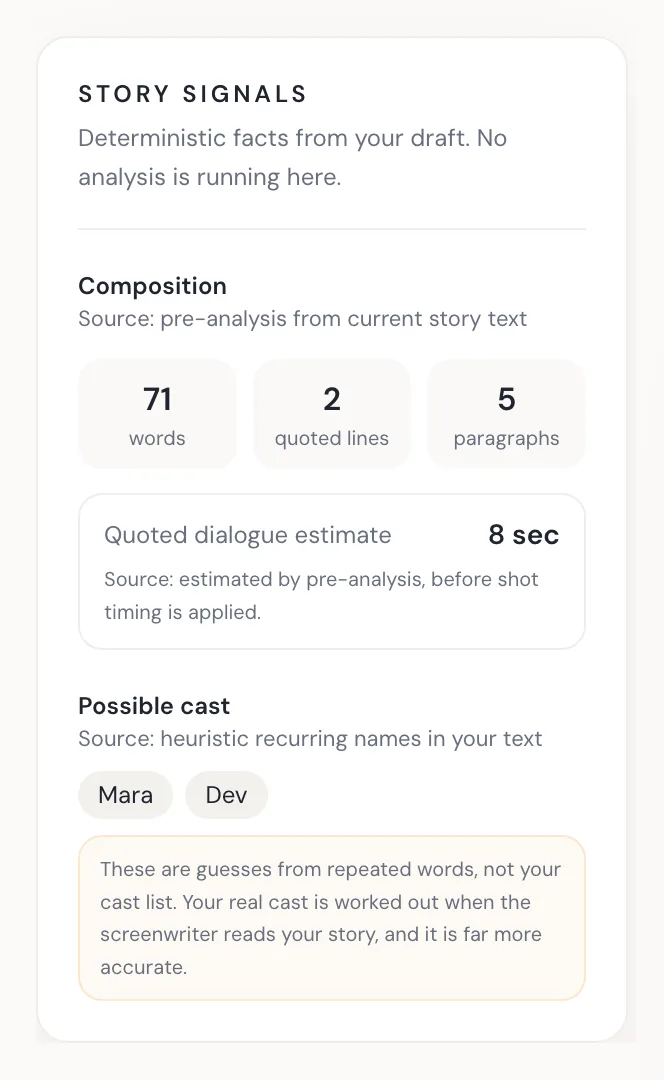
This matters for more than tone. The wizard uses your quoted dialogue to estimate how long the spoken parts of your film will run: it counts the words, allows time to actually say them, and adds a small pause. That estimate is what tells you early whether your story is a ninety-second film or a six-minute one — before you have spent anything rendering it.
Dialogue you can hear
Whether that dialogue is actually voiced in the final video depends on the model you render with — some include audio, some charge for it, some are silent. See the model guide.
Choosing Your Video Model covers which models speak.
Naming your cast
StoryDirector finds your characters by reading names out of the prose. The rule it uses is worth knowing exactly, because it is easy to satisfy by accident and easy to miss by accident:
A capitalised name that appears in at least two separate sentences is picked up as a likely character. Up to six are surfaced. Names that appear only once are not — the engine cannot tell a passing mention from a person who matters, so it waits for a second use.
The rail shown above is this rule running as you type: Mara and Dev both clear the bar and appear as pills, under a note saying plainly that they are guesses from repeated words rather than your cast list.
Two things are deliberately filtered out: ordinary sentence-opening words (The,
When, After, and so on), and words that already appear in your detected
setting — so a story set in Prague does not cast Prague.
Do
- Give people names, and use each name more than once.
- Name only the people the story actually needs on screen.
- Describe a character the first time they appear — a line is enough.
Don't
- Refer to everyone as "he", "she" or "the man" — there is no name to hold onto.
- Introduce a name once and never repeat it.
- Name every extra in the room; each one becomes someone to cast.
Groups are not characters
A crowd, a squad, a chorus — StoryDirector treats those as a group rather than as a person, and does not generate an identity image for them. The video model casts them from your description instead. If someone in that group matters, name them in the story and they become their own character.
Non-human characters
Animals, creatures and non-human characters work exactly like anyone else — they get the same seat in your cast. But there is a real thing to know: StoryDirector reads species out of your words. There is no species field to fill in anywhere. It looks at the name, the aliases, and the description.
So write it in. "Bramble, an old badger" gives the engine everything it needs; "Bramble" alone does not. And note that names which are also common human names — Fox, Wolf, Robin, Drake — are deliberately not read as species, because the engine cannot tell a fox from someone surnamed Fox. If your character is literally a fox, say so in the description.
Simple mode and Director mode
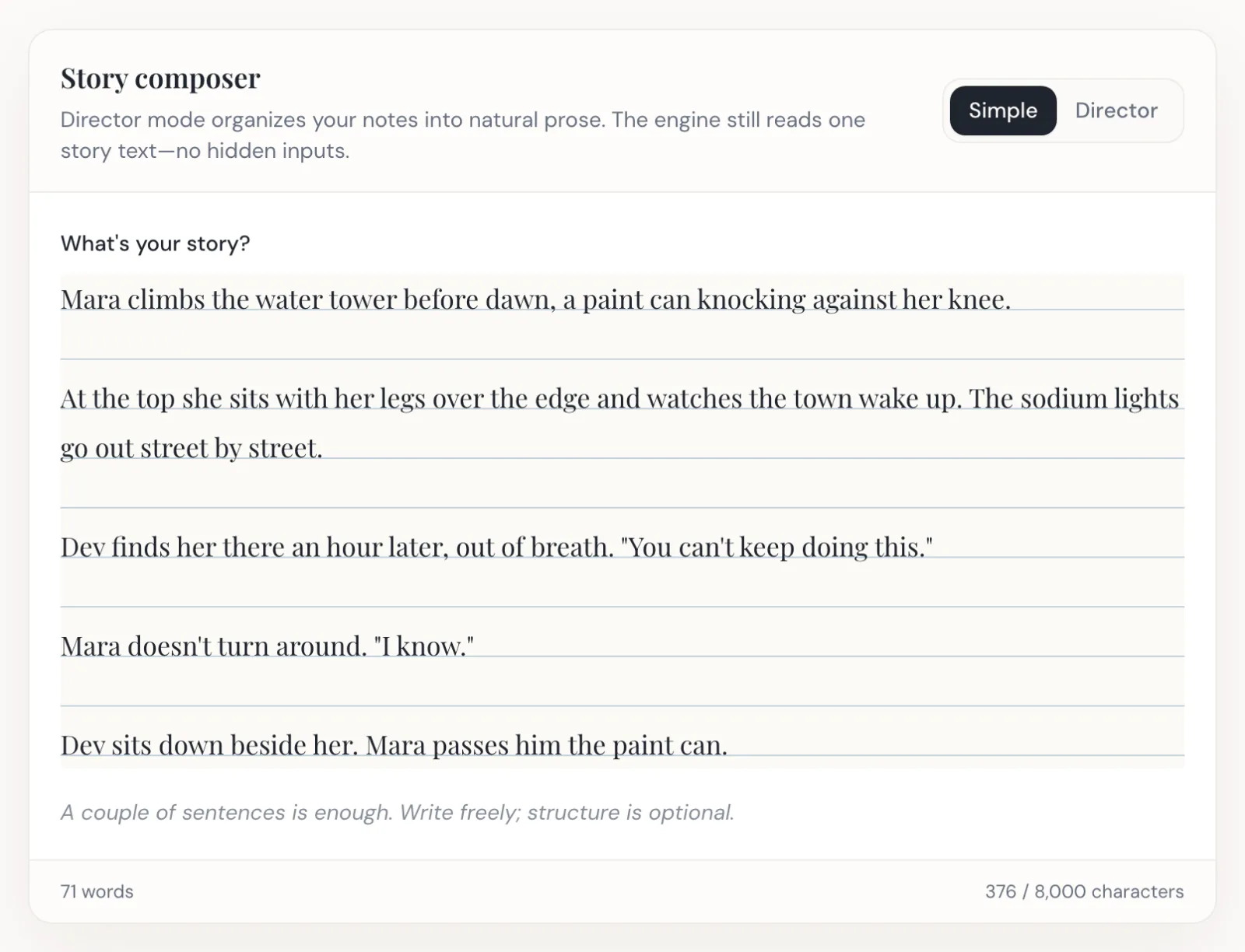
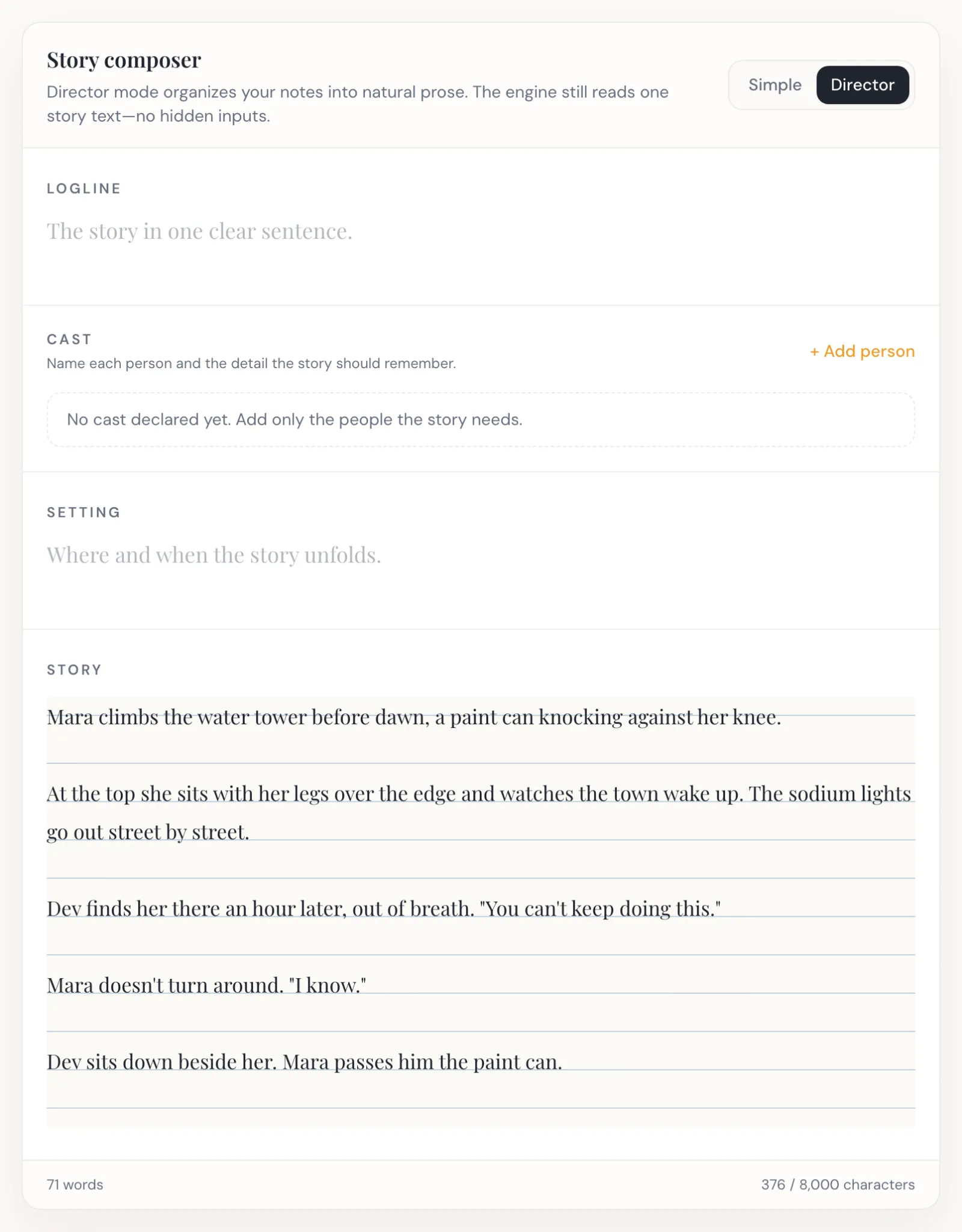
The story composer has two modes, and the important thing about them is what they have in common: both produce one story text, and that is all the engine ever reads. There are no hidden fields and no second input.
- Simple — one field. Write the story.
- Director — labelled sections for a logline, your cast, the setting, and the story. StoryDirector assembles them into ordinary prose for you.
Director mode is useful when you know your cast and setting up front and want to declare them rather than hope they are detected. It is not a more powerful mode — it is a more explicit one. Simple mode with well-named characters gets to the same place.
A worked example
Here is a short story written the way this guide suggests. It is the same story shown in the captures above:
Mara climbs the water tower before dawn, a paint can knocking against her knee.

At the top she sits with her legs over the edge and watches the town wake up. The sodium lights go out street by street.

Dev finds her there an hour later, out of breath. "You can't keep doing this."

Mara doesn't turn around. "I know."

Dev sits down beside her. Mara passes him the paint can.
What StoryDirector gets from that, using the rules above:
- Five beats — five blocks separated by blank lines.
- Two lines of dialogue — two quoted spans. The wizard turns those into a running estimate of your spoken time as you type.
- Two characters — Mara is named in three separate sentences, Dev in two. Both clear the two-sentence bar, though Dev only just does; a third mention would make him unmissable.
- One location — the water tower, established in the first beat and never left.
Note what the last beat is doing: "Mara passes him the paint can" costs one short sentence and earns Mara a third mention while closing the story on the object it opened with. Structure and detectability are usually the same edit.
Notice what is not in there: no camera directions, no shot numbers, no scene headings. The engine writes those. Your job is the story.
Next
Once your story is written, the engine reads it and shows you what it found. The Director Review is where you check that it read you correctly — and Character Generation & Identity is where the people you just named get faces.
Ready to direct one of your own?